TalentFolio Developer Guide
Table of Contents
- Setting up, getting started
- Design
a. Architecture
b. UI component
c. Logic component
d. Model component
e. Storage component
f. Common classes - Implementation
a. Filter feature
b. Undo feature
c. Sort/numerical sort feature - Documentation, logging, testing, configuration, dev-ops
- Appendix: Requirements
a. Product scope
b. User stories
c. Use cases
d. Non-Functional Requirements
e. Glossary - Appendix: Instructions for manual testing
a. Launch and shutdown
b. Deleting a person
c. Saving data - Appendix: Planned Enhancements
Acknowledgements
- Libraries used: Checkstyle, Jackson, Jacoco, JavaFX, JUnit, Shadow
- References used: SE-EDU initiative, AB3
Setting up, getting started
Refer to the guide Setting up and getting started.
Design
Architecture
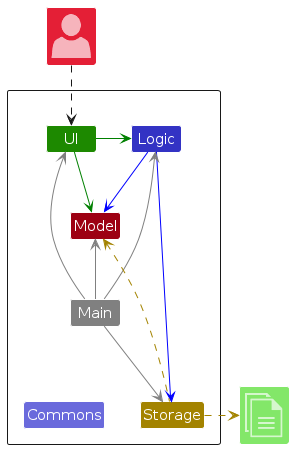
The Architecture Diagram given above explains the high-level design of the App.
Given below is a quick overview of main components and how they interact with each other.
Main components of the architecture
Main (consisting of classes Main and MainApp) is in charge of the app launch and shut down.
- At app launch, it initializes the other components in the correct sequence, and connects them up with each other.
- At shut down, it shuts down the other components and invokes cleanup methods where necessary.
The bulk of the app's work is done by the following four components:
UI: The UI of the App.Logic: The command executor.Model: Holds the data of the App in memory.Storage: Reads data from, and writes data to, the hard disk.
Commons represents a collection of classes used by multiple other components.
How the architecture components interact with each other
The Sequence Diagram below shows how the components interact with each other for the scenario where the user issues the command delete 1.
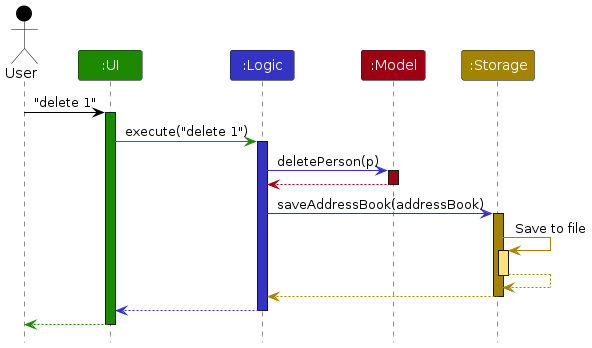
Each of the four main components (also shown in the diagram above),
- defines its API in an
interfacewith the same name as the Component. - implements its functionality using a concrete
{Component Name}Managerclass (which follows the corresponding APIinterfacementioned in the previous point.
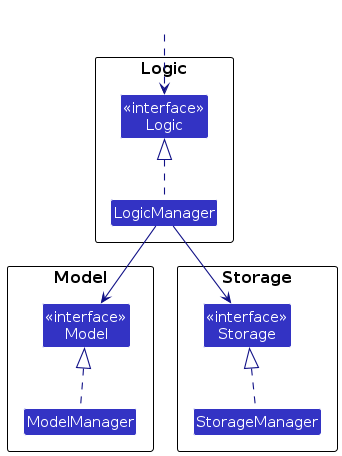
For example, the Logic component defines its API in the Logic.java interface and implements its functionality using the LogicManager.java class which follows the Logic interface. Other components interact with a given component through its interface rather than the concrete class (reason: to prevent outside component's being coupled to the implementation of a component), as illustrated in the (partial) class diagram below.
The sections below give more details of each component.
UI component
The API of this component is specified in Ui.java
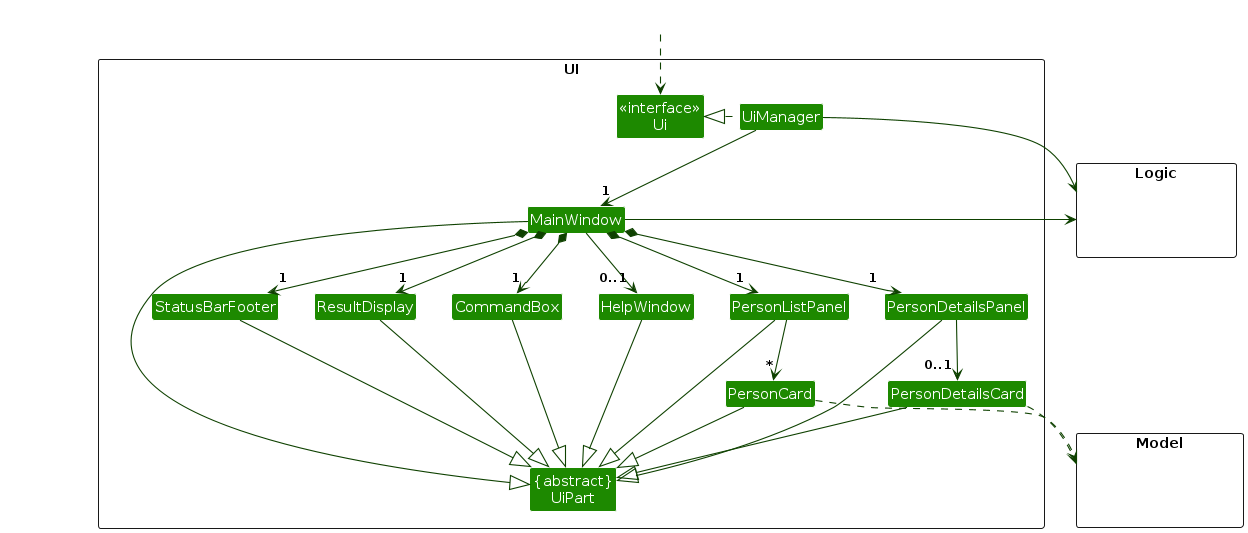
The UI consists of a MainWindow that is made up of parts e.g., CommandBox, ResultDisplay, PersonListPanel, StatusBarFooter etc. All these, including the MainWindow, inherit from the abstract UiPart class which captures the commonalities between classes that represent parts of the visible GUI.
The UI component uses the JavaFx UI framework. The layout of these UI parts are defined in matching .fxml files that are in the src/main/resources/view folder. For example, the layout of the MainWindow is specified in MainWindow.fxml
The UI component,
- executes user commands using the
Logiccomponent. - listens for changes to
Modeldata so that the UI can be updated with the modified data. - keeps a reference to the
Logiccomponent, because theUIrelies on theLogicto execute commands. - depends on some classes in the
Modelcomponent, as it displaysPersonobject residing in theModel.
Logic component
API : Logic.java
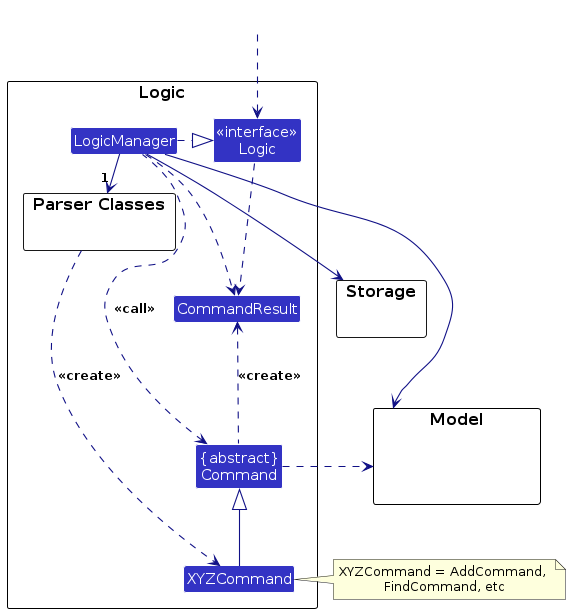
Here's a (partial) class diagram of the Logic component:
The sequence diagram below illustrates the interactions within the Logic component, taking execute("delete 1") API call as an example.
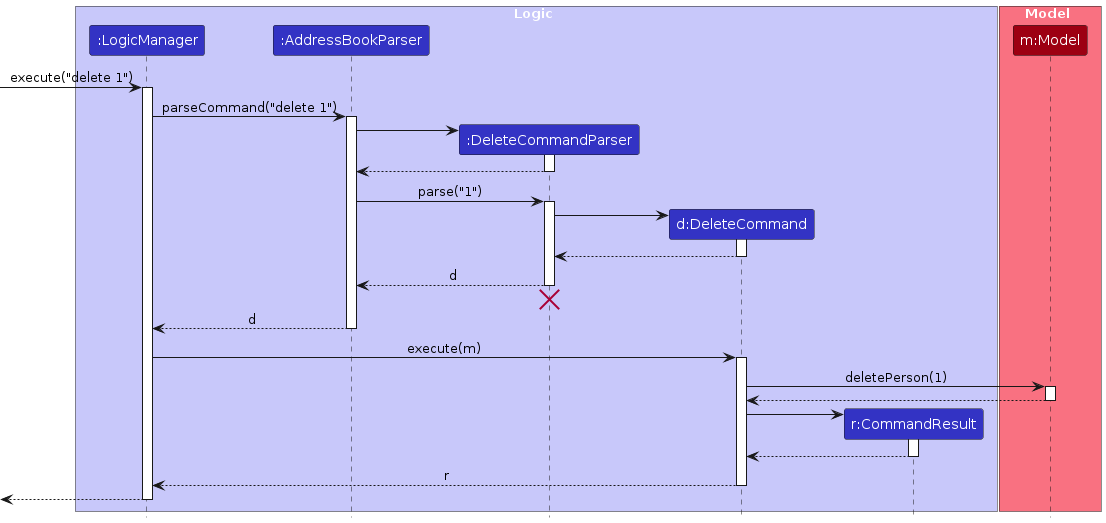
Note: The lifeline for DeleteCommandParser should end at the destroy marker (X) but due to a limitation of PlantUML, the lifeline continues till the end of diagram.
How the Logic component works:
- When
Logicis called upon to execute a command, it is passed to anAddressBookParserobject which in turn creates a parser that matches the command (e.g.,DeleteCommandParser) and uses it to parse the command. - This results in a
Commandobject (more precisely, an object of one of its subclasses e.g.,DeleteCommand) which is executed by theLogicManager. - The command can communicate with the
Modelwhen it is executed (e.g. to delete a person).
Note that although this is shown as a single step in the diagram above (for simplicity), in the code it can take several interactions (between the command object and theModel) to achieve. - The result of the command execution is encapsulated as a
CommandResultobject which is returned back fromLogic.
Here are the other classes in Logic (omitted from the class diagram above) that are used for parsing a user command:
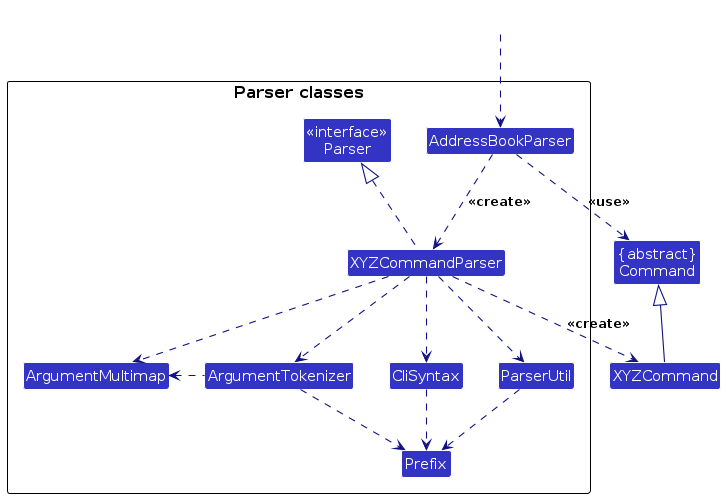
How the parsing works:
- When called upon to parse a user command, the
AddressBookParserclass creates anXYZCommandParser(XYZis a placeholder for the specific command name e.g.,AddCommandParser) which uses the other classes shown above to parse the user command and create aXYZCommandobject (e.g.,AddCommand) which theAddressBookParserreturns back as aCommandobject. - All
XYZCommandParserclasses (e.g.,AddCommandParser,DeleteCommandParser, ...) inherit from theParserinterface so that they can be treated similarly where possible e.g, during testing.
Model component
API : Model.java
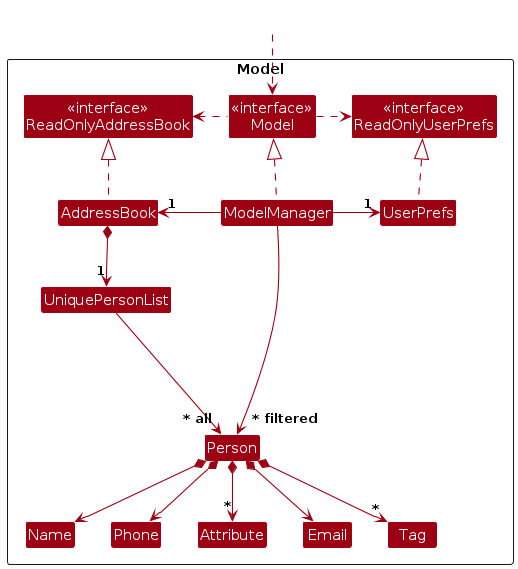
The Model component,
- stores the candidates' data i.e., all
Personobjects (which are contained in aUniquePersonListobject). - stores the currently 'selected'
Personobjects (e.g., results of a search query) as a separate filtered list which is exposed to outsiders as an unmodifiableObservableList<Person>that can be 'observed' (e.g., the UI can be bound to this list so that the UI automatically updates when the data in the list changes). - stores a
UserPrefobject that represents the user’s preferences. This is exposed to the outside as aReadOnlyUserPrefobjects. - does not depend on any of the other three components (as the
Modelrepresents data entities of the domain, they should make sense on their own without depending on other components)
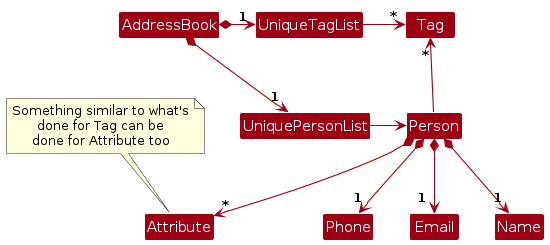
Note: An alternative (arguably, a more OOP) model is given below. It has a Tag list in the AddressBook, which Person references. This allows AddressBook to only require one Tag object per unique tag, instead of each Person needing their own Tag objects.
Storage component
API : Storage.java
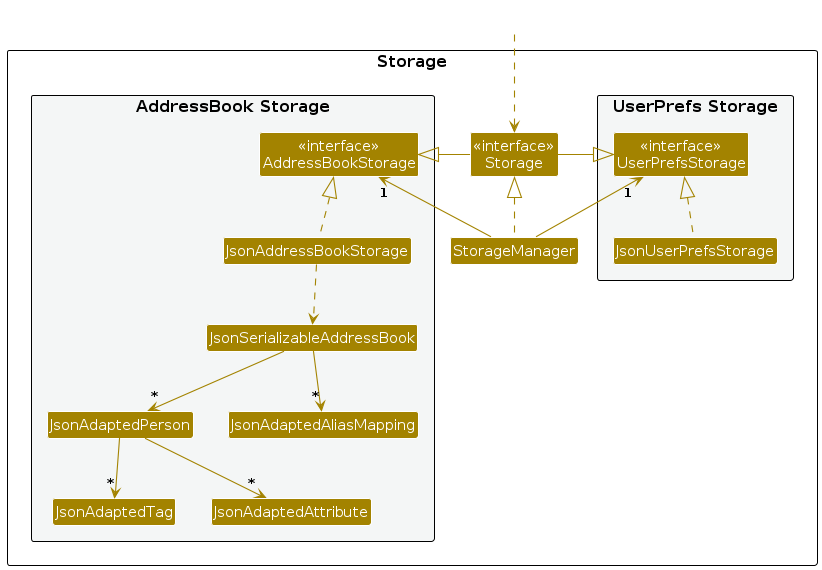
The Storage component,
- can save candidates' data, attribute-link mappings and user preference data in JSON format, and read them back into corresponding objects.
- inherits from both
AddressBookStorageandUserPrefStorage, which means it can be treated as either one (if only the functionality of only one is needed). - depends on some classes in the
Modelcomponent (because theStoragecomponent's job is to save/retrieve objects that belong to theModel)
Common classes
Classes used by multiple components are in the seedu.address.commons package.
Implementation
This section describes some noteworthy details on how certain features are implemented.
Filter feature
The following describes how the filter command filter a/Mayor=CS is executed.
First, FilterCommandParser parses a set of attributes (i.e., the pair of Mayor and CS), creating a new instance of FilterCommand. The procedure is almost the same as shown in the logic component section. FilterCommand is initialized with the attribute(s) and wasDuplicate, set true when there is a duplicate in input attributes. This boolean parameter is later used to generate a warning message about the duplicate. In this case, this parameter is set false.
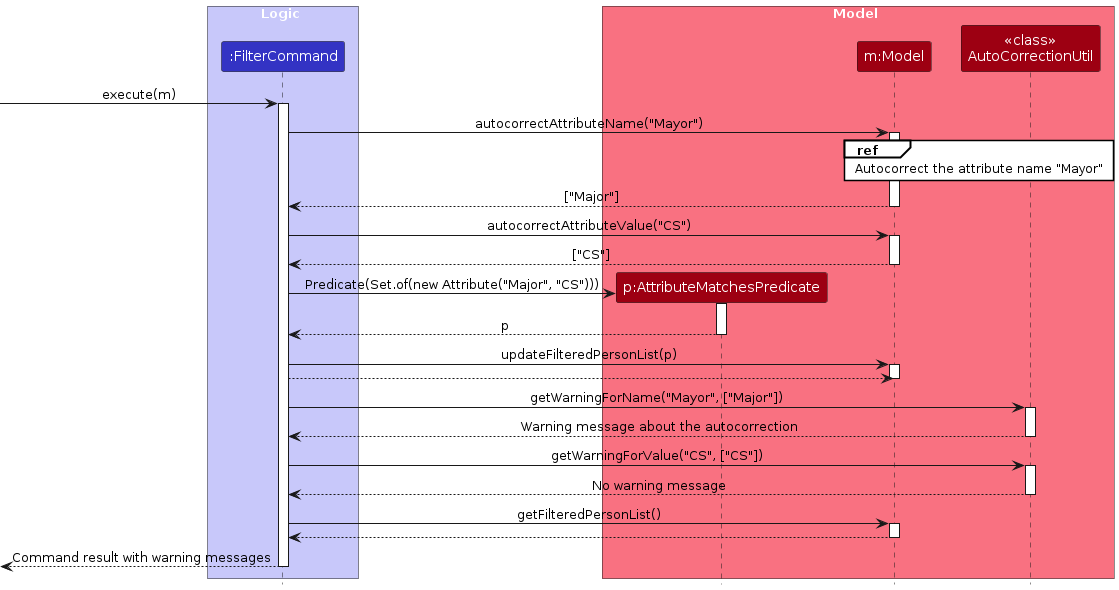
Next, FilterCommand::execute(m) is called. The method consists of three steps:
- autocorrection of
MayorandCS, - creation and application of filtering predicate, and
- generation of warning messages.
The following sequence diagram illustrates how the method works at the low-level:
To autocorrect the attribute name Mayor, the Model goes through the following process:
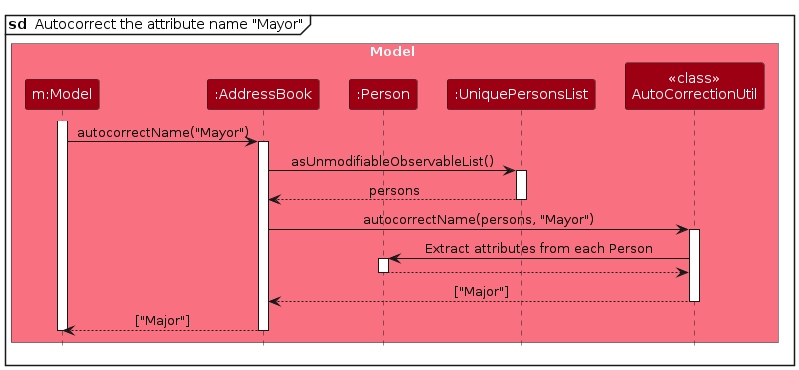
The attribute value CS will be autocorrected in a similar way.
Alternatively, if there is no attribute name/value close enough to Mayor/CS, nothing will be returned from autocorrectAttributeName/Value; this is why their return value is Optional<String>.
The second parameter for getWarningForName/Value (i.e., corecctedName/Value) is also Optional<String>, meaning the method can also generate a warning message that no candidate has the input attribute name/value. The recommended usage is to pass the return value of autocorrectAttributeName/Value directly as this second parameter.
If there are multiple attributes given to the filter command, each attribute will go through the same process as above. Specifically, the command
- first autocorrects all the attributes,
- followed by the creation and application of predicate with the corrected attributes, and
- obtains warning messages for the entire attribute name/values.
Please also note that, in the actual implementation, the command repeats the autocorrection process during the acquisition of warning messages. This is for the sake of simplicity of code.
Undo feature
The undo mechanism is implemented inside Model. Model now implements the following operations:
Model#saveState()- Saves the currentAddressBookin its history. This is executed before every command inLogicManager.Model#revertLastState()- Reverts theAddressBookto the last state inModel's history.
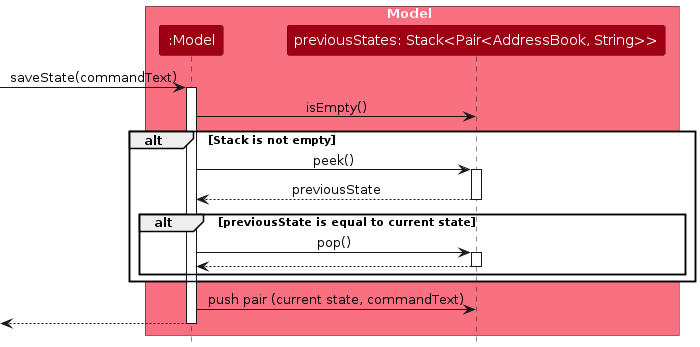
Model stores a Stack of AddressBook-s. To save the current data, it creates a copy of the current AddressBook object, but copies the Person object by reference. This feature therefore requires that Person is not modified in-place when editing, but instead re-constructed.
To prevent the case where an UndoCommand does not change any data, Model#saveState() enforces that duplicate states will not be saved. Similarly, Model#revertLastState() enforces that it will not revert to an AddressBook which is equal to the current AddressBook, using the Java Object#equals() method.
As AddressBook#equals() only checks for UniquePersonList and aliasMappings, only changes to these will be undone.
The following sequence diagram illustrates how Model#saveState() is implemented.
The following sequence diagram illustrates how UndoCommand#execute() is implemented.
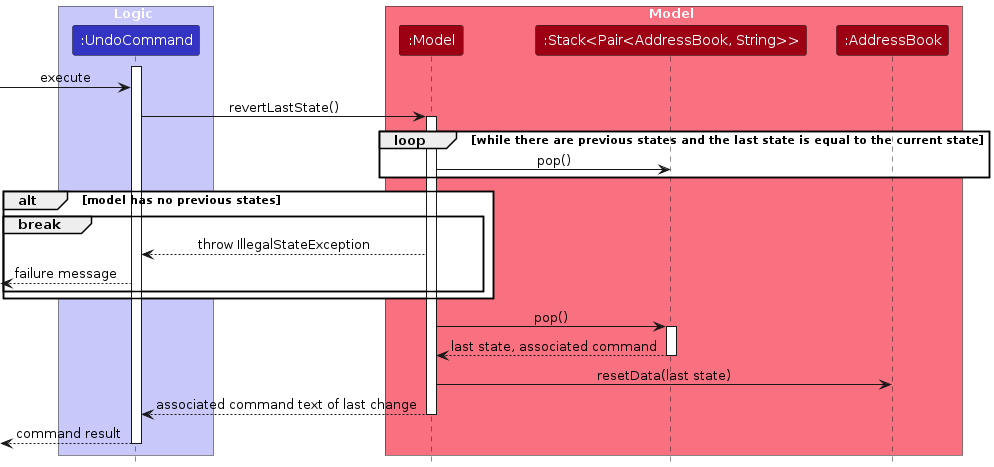
It is noteworthy that although saveState() is called before UndoCommand gets executed, the undoing still works as revertLastState() ensures it will revert to a different AddressBook.
Sort/numerical sort feature
Sorting is currently done via custom comparators. Due to the similarity between the two sort commands, we have two classes that inherit from an abstract class SortCommand: LexSortCommand for the default alphabetical sort, and NumSortCommand for numerical sort.
First, LexSortCommandParser/numSortCommandParser parses an attribute name and an optional field order parameter, creating a new instance of LexSortCommand/NumSortCommand. The procedure is almost the same as shown in the logic component section. The instance is initialized with the attribute name and a boolean variable isAscending, which is set to true or false depending on the user input.
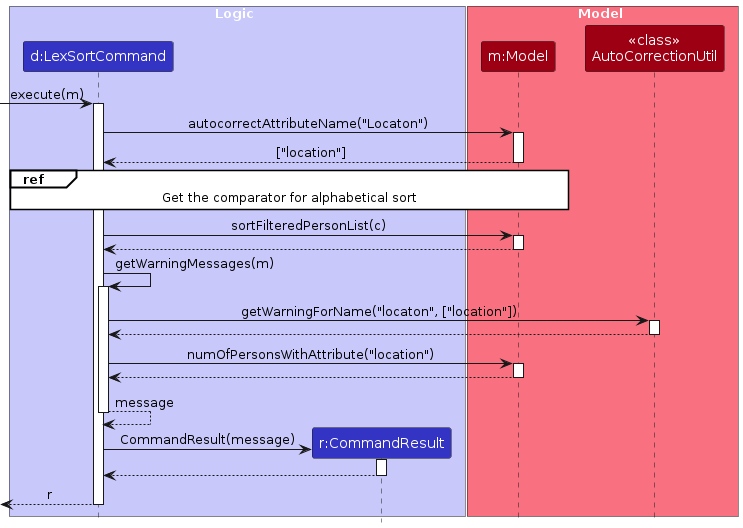
Next, SortCommand::execute(m) is called. The method consists of three steps:
- autocorrection of the attribute name,
- creation and application of sort comparators, and
- generation of warning messages from autocorrection and missing attribute/numerical value.
Note that autocorrection in Step 1 and the generation of warnings about autocorrection in Step 3 use the same implementation as the one mentioned in the filtering section.
The following sequence diagrams show how a default sort operation "sort a/Location o/ascending" is executed (the autocorrection process in Step 1 is omitted):
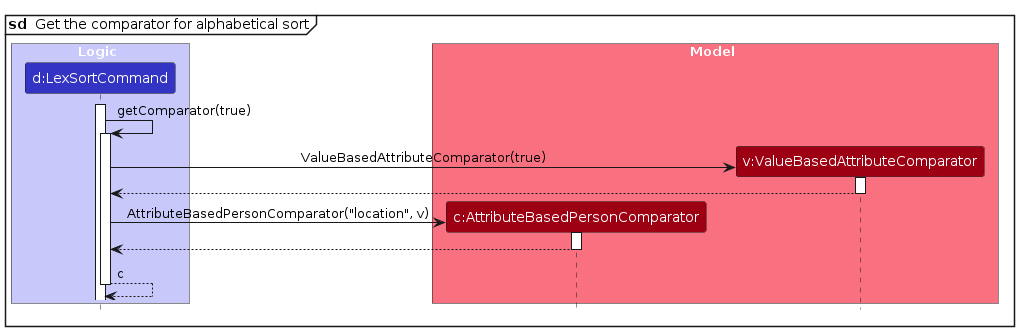
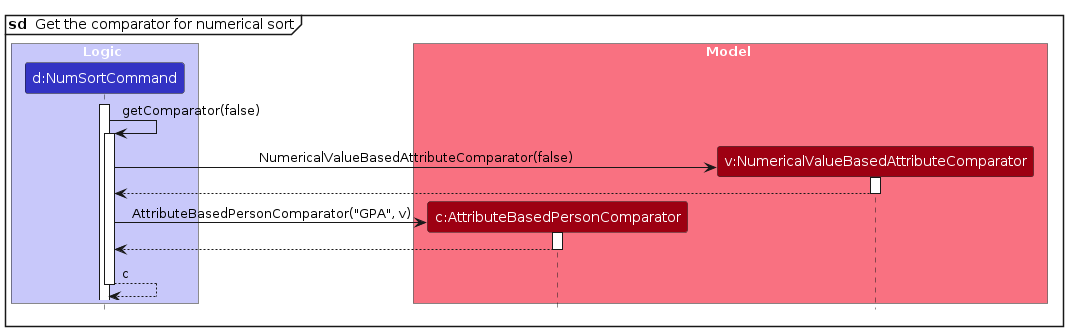
The process of a numerical sort operation "sort-num a/GPA o/descending" is similar to the above, except for comparator used (refer to the diagram below) and an extra call to Model::numOfPersonsWithNumericalValue when generating the warning message.
Documentation, logging, testing, configuration, dev-ops
Appendix: Requirements
Product scope
Target user profile:
- Is a hiring manager
- Has a need to manage a significant number of candidates
- Prefers desktop apps over other forms of software
- Can type fast
- Prefers typing to mouse interactions
- Is reasonably comfortable using CLI apps
Value proposition: Provides fast access to candidates and their socials, while allowing the user to quickly filter candidates.
User stories
Priorities: High (must have) - * * *, Medium (nice to have) - * *, Low (unlikely to have) - *
| Priority | As a … | I want to … | So that … |
|---|---|---|---|
* * * | new user | see a user guide | I can learn how to use the app |
* * * | user | add a candidate | I can store their information in the app |
* * * | user | delete a person | I can remove candidates that are no longer under consideration |
* * * | user | find a candidate by name | I can conveniently retrieve a candidate's information |
* * * | user managing a number of candidates | sort candidates by some value (graduation years, discipline, etc.) | I can view relevant candidates easily |
* * * | user managing a number of candidates | filter candidates by some value (graduation years, discipline, etc.) | I can view relevant candidates easily |
* * * | user frequently exiting/reopening the app | restore last session's data | exiting the app does not hinder my usage |
* * | advanced user | edit the data file directly | I can update candidates' information more quickly |
* * | new user | delete the sample candidates all at once | I can start using the app with my own data easily |
* * | user who is managing information of high privacy concerns | ensure that the system is safe enough (i.e., no significant risk of data leakage) | I can protect candidates' privacy well |
* * | existing user who forgets about the available commands | view a list of all commands and their syntax easily | I can check against the list |
* * | meticulous user | edit a candidate's information | I can keep my app up to date |
* * | user required to share the information on candidates with others | select candidates and print out their information, in an organized way | I can present the candidates to others |
* * | user interviewing the candidates | relate the date of interview to the candidates | I can organize my schedule easily |
* * | user managing candidates across different positions | tag candidates | I can easily categorize them |
* * | user needing to look into each candidate | display a panel showing their complete information | I can view their details at a glance |
* * | user managing socials of candidates | open the website link to their profile | I can easily access and review them |
* * | user managing candidates' socials of common platforms (e.g., github) | associate the site domain url with the site name | I do not have to type the url every time |
* * | forgetful user | see my most recent commands | I can be reminded of what changes I just made |
* * | careless user | navigate through my most recent commands | I don't have to retype my previous command should there be typos |
* * | careless user | undo my most recent command | accidental changes I make can be reverted easily |
* * | CLI-oriented user | exit the app with a command | I do not have to use the mouse at all |
* | user changing their computer | import my data | I can transfer data over from my old computer |
* | user changing their computer | export my data | I can transfer it over to the new computer |
* | user who is familiar with regular expressions | use regular expressions when searching for certain keywords among candidates | more customized searches can be done |
* | use who needs to collaborate with others | synchronize my database with others | we can stay on the same page |
* | frequent user | create snippets for commands | I can enter frequently-used commands more quickly |
* | recruiter who needs to regularly delete candidates at the end of each recruiting season | have built-in scripts to automatically delete irrelevant candidates (i.e., those who meet certain conditions) | I don't have to manually perform deletions routinely |
* | careless user | have my command autocorrected | I don't need to fix my typos |
* | busy user | have my command predicted and auto-filled | I can save time typing commands in full |
* | event organizer | quickly find people who live near to a certain location | I can choose suitable candidates to invite to an event |
* | user managing numeric properties of candidates (e.g., GPA) | sort their properties in numeric order | I can rank candidates by this property |
* | user managing various properties of candidates | sort them in both ascending and descending order | I can rank candidates more easily |
Use cases
(For all use cases below, the System is TalentFolio and the Actor is the user, unless specified otherwise)
UC01 - Add a candidate
MSS
User requests to add a candidate with the specified details.
System verifies that the input values are valid.
System adds the candidate.
System displays confirmation message.
System updates the displayed list to include the new candidate.
Use case ends.
Extensions
2a. System detects invalid inputs.
2a1. System displays an error.
Use case ends.
UC02 - Delete a candidate
Preconditions: The current list of candidates is not empty.
MSS
User requests to delete a candidate by specifying their index.
System verifies that the index is valid.
System deletes the candidate.
System displays confirmation message.
System removes the candidate from the displayed list.
Use case ends.
Extensions
2a. System detects an invalid index.
2a1. System displays an error.
Use case ends.
UC03 - View previous commands
MSS
User requests for the previous executed command.
System shows the user the previous executed command.
Steps 1-2 are repeated as many times as the user desires.
Use case ends.
Extensions
1a. System detects no previous command.
1a1. No change occurs.
Use case ends.
UC04 - View next commands
Precondition: User must be viewing previous commands.
MSS
User requests for the next executed command.
System shows the user the next executed command.
Steps 1-2 are repeated as many times as the user desires.
Use case ends.
Extensions
1a. System detects no next command.
1a1. No change occurs.
Use case ends.
UC05 - Navigate command history
MSS
User views previous commands (UC03).
User views next commands (UC04).
Steps 1-2 are repeated as many times as the user desires.
Use case ends.
UC06 - Execute past command
MSS
User navigates command history (UC05).
User selects a command to execute.
System executes the command.
Use case ends.
Extensions
3a. System encountered an error while executing the command.
3a1. System displays an error.
Use case ends.
Non-Functional Requirements
- Should work on any mainstream OS as long as it has Java
17or above installed. - Should be able to hold up to 1000 persons without any noticeable sluggishness in performance for typical usage.
- A user with above average typing speed for regular English text (i.e. not code, not system admin commands) should be able to accomplish most of the tasks faster by using commands as compared to using the mouse.
- Logs must be automatically generated.
- Logs must be identical across different operating systems to enable sharing between the same app on different OS platforms.
- Copy and paste should be supported in text fields, allowing the user to enter information without typing manually.
- The app has to respond within one second.
- The app must remain functional even if the user manually modifies the JSON file and should not crash, even with incorrect modifications.
Glossary
- Attribute: A key-value pair associated with a candidate.
- For example,
Graduation Year: 2027is an attribute, where the attribute name isGraduation Yearand the attribute value is2027.
- For example,
- Candidate: Any person in
TalentFolio. May be used interchangeably with the term "person". - Command: A string of text that the user enters via the command line.
- Duplicate: A string that matches another string exactly, ignoring case.
- Mainstream OS: Windows, Linux, Unix, macOS.
- Valid email: A string of characters of the form
{local-part}@{domain}adhering to the following constraints:{local-part}contains only alphanumeric characters and the special characters+_.-, and cannot start or end with a special character.{domain}consists of domain labels separated by periods (.), where the last domain label is at least 2 characters long.- Each domain label contains only alphanumeric characters and hyphens (
-), and cannot start or end with a hyphen.
- Valid name: Any sequence containing only whitespace, alphanumeric characters, and the special characters
()/@-',._. The sequence cannot start with a special character, and/should only be used in the phrases/oord/o.
Appendix: Instructions for manual testing
Given below are instructions to test the app manually.
Note: These instructions only provide a starting point for testers to work on; testers are expected to do more exploratory testing.
Launch and shutdown
Initial launch
Download the jar file and copy into an empty folder
Double-click the jar file Expected: Shows the GUI with a set of sample candidates. The window size may not be optimum.
Saving window preferences
Resize the window to an optimum size. Move the window to a different location. Close the window.
Re-launch the app by double-clicking the jar file.
Expected: The most recent window size and location is retained.
Checking for the default setting of site link
Delete
data/talentfolio.jsonand re-open the app.
Expected: Attributes with the namegithuborlinkedinhave a different color (red-purple) from other attributes (blue-purple).Run a
showcommand and click somegithubandlinkedinattributes.
Expected: They open (or copy) the link to the correctly associated website.
Deleting a person
Deleting a person while all persons are being shown
Prerequisites: List all persons using the
listcommand. Multiple persons in the list.Test case:
delete 1
Expected: First candidate is deleted from the list. Details of the deleted candidate shown in the status message. Timestamp in the status bar is updated.Test case:
delete 0
Expected: No person is deleted. Error details shown in the status message. Status bar remains the same.Other incorrect delete commands to try:
delete,delete x,...(where x is larger than the list size)
Expected: Similar to previous.
Deleting a person under an effect of filtering
Prerequisites: Some filtering or finding command is applied.
- Test case:
delete 1
Expected: First candidate in the filtered list (not the original, entire list) is deleted. The filtering is cleared.
- Test case:
Sorting the list (alphabetically and numerically)
Sorting the list by an attribute name that all persons have
Prerequisites: Multiple persons in the list. All have the attribute name
Degree.Test case:
sort a/Degree
Expected: All persons are sorted by theirDegreein ascending alphabetical order.Test case:
sort a/Degree o/dsc
Expected: All persons are sorted by theirDegreein descending alphabetical order.Test case:
sort a/Degre
Expected: A warning is shown for autocorrectingDegreintoDegree. Remaining behaviour is same assort a/Degree
Sorting the list by an attribute name that some but not all persons have
Prerequisites: Multiple persons in the list, Some have the attribute "Location" but some don't.
Test case:
sort a/LocationExpected: Persons with the attribute name
Locationis placed to the front of the list, and they are sorted by theirLocationin ascending alphabetical order. A warning is displayed to highlight the last person with the attribute name in the sorted view.
Sorting the list by an attribute name that is missing from the current list view
Prerequisites: No persons in the list have the attribute name "Graduation Year".
Test case:
sort a/Graduation YearExpected: A warning is shown for the missing attribute name. No change in the order of persons in the list.
Repeating above tests for sorting numerically (i.e., replace
sortin the test cases bysort-num, make all relevant attribute values numerical)Sorting the list by the numerical value of an attribute name, where some entries have the attribute but lack a numerical value
Prerequisites: Multiple persons in the list. Some have the attribute name
Expected Salarywith a numerical value (without the dollar sign), and some haveExpected Salarywith anNAvalue.Test case:
sort-num a/Expected SalaryExpected: In the sorted view, you will see persons with numerical values for
Expected Salarysorted by ascendingExpected Salaryvalues, followed by persons with anNAvalue forExpected Salaryin their original order, then all other persons without theExpected Salaryattribute name in their original order. Warnings are shown to highlight the last person with the specified attribute and the last person with a numerical value respectively.
Sorting the list by the numerical value of an attribute name, where some entries have the attribute but none of them have a numerical value
Prerequisites: Multiple persons in the list. All have the attribute name
Schoolwith non-numerical attribute values.Test case:
sort-num a/SchoolExpected: A warning about numerical value for
Schoolbeing completely missing will be displayed. Still, all persons with theSchoolattribute will be placed at the front of the list.Test case:
sort-num a/School o/dExpected: Exact same behaviour as the previous test.
Saving data
Dealing with missing/corrupted data files
Try the following test cases one by one.
Expected (common in all cases): The app does not load the broken JSON file and clears all the stored information–the candidate list will be empty, and the default site link setting forgithubandlinkedintake effect.Test case: duplicated name–change the two candidates' name to
pochi.Test case: Non-numerical phone number–change a phone number to
1234-5678.Test case: Invalid email–change an email address to
pochi2gmail.com.Test case: Empty tag name–change the a tag to an empty string (
"").Test case: Missing attribute name/value in
attributes–delete either an attribute name or value, while keeping the other.Test case: Missing attribute name/site link in
urlSettings–delete either an attribute name or site link, while keeping the other.Test case: Invalid attribute name/value in
attributesandurlSettings–change an attribute name/value to include/,\, or=.Test case: Empty attribute name/value in
attributesandurlSettings–change an attribute name/value to an empty string ("").
Triggering corner cases for
urlSettingsTest case: capital
attributeName–change an attribute name toGITHUB. Expected: The app works, associating the site link withgithub.Test case: empty
site link–change a site link to an empty string (""). Expected: The app works, allowing the user to copy the raw attribute value.Test case: duplicated
attributeName–change two attribute names tolinkedin. Expected: The app works, taking the site link appearing first.
Appendix: Planned Enhancements
Team size: 5
Add validation for links associated with an attribute name
Currently, theSITE_LINKfield in the commandlink a/ATTRIBUTE_NAME=SITE_LINKis not checked to ensure that the user entered an actual link. We plan to add some validation to ensure that the link entered is a valid link.Make error messages associated with an invalid index more consistent
Currently, using a command that accesses an index (such asshow,edit, etc.) with a non-positive index gives the error messageInvalid command format!followed with a description of the command. Specifying an index that is out of range instead gives the error messageThe person index provided is invalid. We plan to make this behaviour consistent, such that the same error message is shown in either case.Support international phone number formats
Currently, only numbers are allowed in the phone number field. We plan to allow spaces and characters such as+-(), so that the user can store phone numbers in international formats such as+65 8841 9716and+1 (209) 749-4459. This may also require us to perform validation on the phone number, to verify that it matches one of the valid international phone number formats (if it contains symbols).Add validation for the inputs in the
findcommand
Currently, thefindcommand has no input validation, so a command such asfind symbols$*&)123is valid syntax. Since thefindcommand only finds names, a valid search should only involve characters that can appear in names. We plan to add some validation, so that the user can be warned if they are trying to find a symbol that cannot appear in a name.Allow duplicate names
Currently, candidates are distinguished solely by their name. However, as the user manages a larger number of candidates, duplicate names are likely to occur. Therefore, we plan to use a combination of name and phone number as the identifier, since:it is unlikely that different candidates will share the same name and phone number, and
if they do, it is likely the result of an error.
Warn on duplicate contact info (phone number and email addresses)
Currently, the user can add (or edit) candidates with duplicate phone numbers or email addresses. However, since it is quite rare for different candidates to share the same contact information, we plan to enable a warning when such a duplicate is detected. This will help the user notice and correct potential errors more easily.Prohibit extraneous parameters
Currently, the app accepts commands likefilter t/Excel a/Major=Computer Scienceandlink 1 a/github=https://github.com/. However, this flexibility might cause misunderstandings – for example, accepting such commands might cause the user to think that they can filter by both tags and attributes, or add associations between attribute names and site links at the individual candidate level. To reduce the risk of such misconceptions, we plan to prohibit extraneous parameters in these commands.